Open-source torrent client for desktop

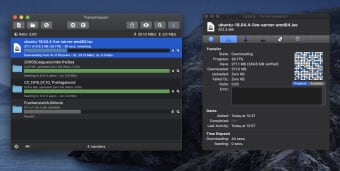
Transmission is a free file-sharing program developed to be a desktop torrenting client to help users share files over the internet. This open-source solution offers a fast and lightweight experience that comes with a clean and simple user interface that will be easy to learn for newcomers.

Despite its small footprint, there is no lack of features with Transmissions as it offers plenty of options and customization as its contemporaries like Vuze or Xtorrent. It also supports both torrent files and magnet links downloaded from across all online sources for improved compatibility and seamless operation.

Torrent made simple

Apart from direct downloads from file-sharing sites, peer-to-peer torrenting is the preferred way to share files over the web for most people. Some of the biggest reasons why is the ease of use and because it's free to get started with. The are plenty of choices in the market today but if you're looking for one that's easy on your system resources, Transmission is one option to consider.

Transmissions are as clean and straightforward as they come, and that is not really a bad thing as it just works without much setup needed. It still comes with all the bells and whistles you've come to expect from a torrent client like advanced download queueing and traffic control. Transfers are also encrypted to ensure your data traffic is anonymous and untraceable.

What's more, recent updates have included native support for the newest BitTorrent v2 protocol for greater security, as well as hybrid torrents for backward compatibility. It's not without its shortcomings, though, as you don't get built-in proxy support with it. Another is that it can be a bit difficult to manage multiple active torrents at the same time—a common scenario for most users.

A solid option

To conclude, if you're looking for a new torrent client and your main priority is speed and ease of use, Transmission is a solid option you should look into. It gets the basics right and will meet the needs of most users. There are some missing features here and there, but if you don't mind those omissions, go and give this one a try now. Recommended.


  • Pros

    • Fast and lightweight
    • Easy to use
    • Support for BitTorrent v2 and Hybrid torrents
  • Cons

    • No proxy support
    • Struggles with multiple active torrents
 0/1

App specs

  • License

    Free

  • Version

    4.1.0
  • Latest update

  • Platform

    Mac

    Other platforms (1)
  • OS

    Mac OS X

  • Language

    English

    Available languages

    • Arabic
    • Czech
    • Danish
    • German
    • Greek
    • English
    • Spanish
    • Finnish
    • French
    • Italian
    • Japanese
    • Korean
    • Dutch
    • Norwegian
    • Polish
    • Portuguese
    • Russian
    • Swedish
    • Turkish
    • Chinese
  • Downloads

    498.6K

    Last month's downloads

    • 113
  • Size

    7.85 MB

  • Developer

Also available in other platforms

Program available in other languages


User reviews about Transmission

4.1

4 reviews

Add review

Main reviews for you

  • Anonymous user

    Sharing is caring or you only grt what you give. Transmission is the best p2p client for the mac. Don't follow the advice of the first reviewer, most of the tutorial clips on You-tube are created by novice kids whose advice is haphazard and confusing. Instead Google "transmission mac connections" and take it from there. Also do not be a "leach", if you share you get. A Low upload speed means horrible download speeds and when your download is complete continue to seed the torrent at least to a 1:1 ratio, this will help your future download speeds.

  • Anonymous user

    Get the older version if you need a proxy. I made the mistake of doing an auto update from version 2.11 to 2.12 and found a necessary feature had disappeared without notice - the ability to connect to an anonymous proxy. I'm not saying I'm downloading copyrighted material with this client, but anyone who is might be advised to use an anonymous proxy service - and this client just doesn't have it anymore. If you're not worried about getting sued by the MPAA or RIAA or their flunkies, go ahead and use this client. It's actually an awesome program with lots of speed and unlike Vuze, it won't kill your Internet service by overwhelming your router with too many connections.

  • Anonymous user

    Best of the web!. I am a virgin Mac user and yet it was dead simple for me to use this torrent client. All files are downloaded very well and it shows the download and upload speeds on the dock icon so you don't have to open it to check the speed. Transmission is lightweight meaning you can do lots of other stuff while it is on.Best is to go to youtube and check some videos on how to tweak some of the settings to increase the speed. You need to do this just once and then it just runs like a supercar every time you download a torrent.Only thing on downside is that you cannot make the upload speed to zero, if you do so it will slow your download speeds dramatically. I have a simple way to eliminate this. Once the file is downloaded I remove it from transmission and store it in its new folder locations.Review in once sentence: This is Rolls Royce of Torrent clients.

  • Anonymous user

    A perfect program. It is lean, feature-filled yet simple and easy to use. Pros: InterfaceSpeedFeaturesSize Cons: None!

More

You may also like

Alternatives to Transmission

Explore Apps

Related Articles

Latest articles

Laws concerning the use of this software vary from country to country. We do not encourage or condone the use of this program if it is in violation of these laws. Softonic does not encourage or condone the illegal streaming, duplication or distribution of copyrighted content. You are solely responsible for any use of the service.
Softonic

Is Transmission safe?

100/100

Score result: Clean

This file passed a comprehensive security scan using VirusTotal technology. It is safe to download.

  • Virus free
  • Spyware free
  • Malware free
  • Verified by Security Partners

    VirusTotal logo

Scan Info

Last scan
Tuesday, June 17, 2025
Scan provider
VirusTotal · Full report

File Integrity

File
Transmission_V4.1.0.dmg
SHA256
03acc472054feee1e8abde3bfdd3a1075fb63f94c32eab69b0bd855500babe8e
SHA1
e0f1ad4d597ccc0023e52ed09f6c7e2d0828ef62

Softonic security commitment

Transmission has been thoroughly scanned by our advanced security systems and verified by industry-leading partners. This file comes from the official developer and has passed all our security checks, showing no signs of viruses, malware, or spyware. For more information, visit our Security and Trust Center